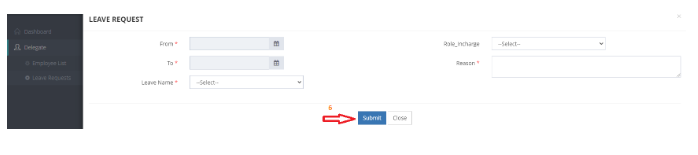
How a delegate can request leave for the subordinate staff?
Introduction:
This document aims to illustrate the importance of the new attendance system. Amrita E-Track is an indigenous application designed to help the organization run a digital attendance system.
This document guides how a delegate can request leave for the subordinate staff.
Getting Started:
To access Amrita Attendance Management System
Open an internet browser (Recommended to use Google Chrome)
Type https://my.amrita.edu/ and click enter
Login with your amrita email id and password.
Click AMRITA E-TRACK
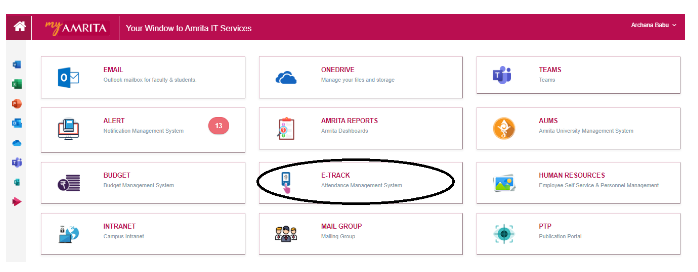
To add leave request for subordinate
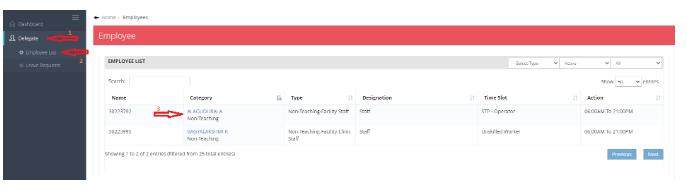
Go to delegate
Select the employee list, there you will be able to get the list of all the staff under that delegate.
Select the staff, whose leave needs to be requested.
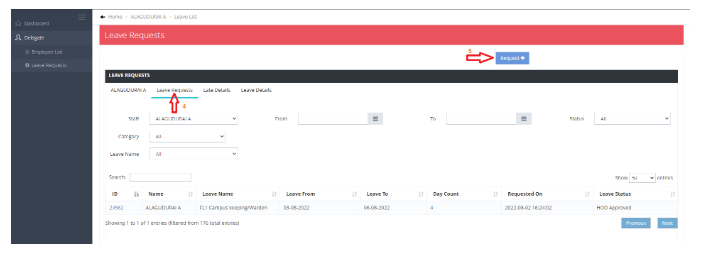
After selecting the Staff, you will be able to see his/her profile.
4. Go to the leave request.
5. Select the request button.
Apply leave and submit.